Do two things. First, ask Instagram for its free copy of your data: it's the way to keep your messages and comments. Then save your posts, Reels, highlights and captions with FeedSaver, so you get your photos as ordinary files on your PC, sorted by date and searchable by caption.
Step 1: Instagram's own download (free)
Instagram will prepare a copy of your account's data for you. It works on the phone app or the website.
- Open Accounts CenterIn Instagram, go to your profile, open the menu, and choose Accounts Center.
- Find “Download your information”It's under Your information and permissions.
- Choose what and howPick your Instagram account and the information you want. Choose HTML if you want to open it in a browser, set the date range to All time, and media quality to High.
- Wait for the emailInstagram prepares the file and emails you a link. It can take a while. The link only works for a few days, so download the file when it arrives.
This gives you your photos, videos, messages, comments and more, as a set of files and pages. Check that the items you need are present. It's not easy to browse: the photos sit in folders by month, and captions are in separate data pages.
Step 2: Your photos as a library you can browse
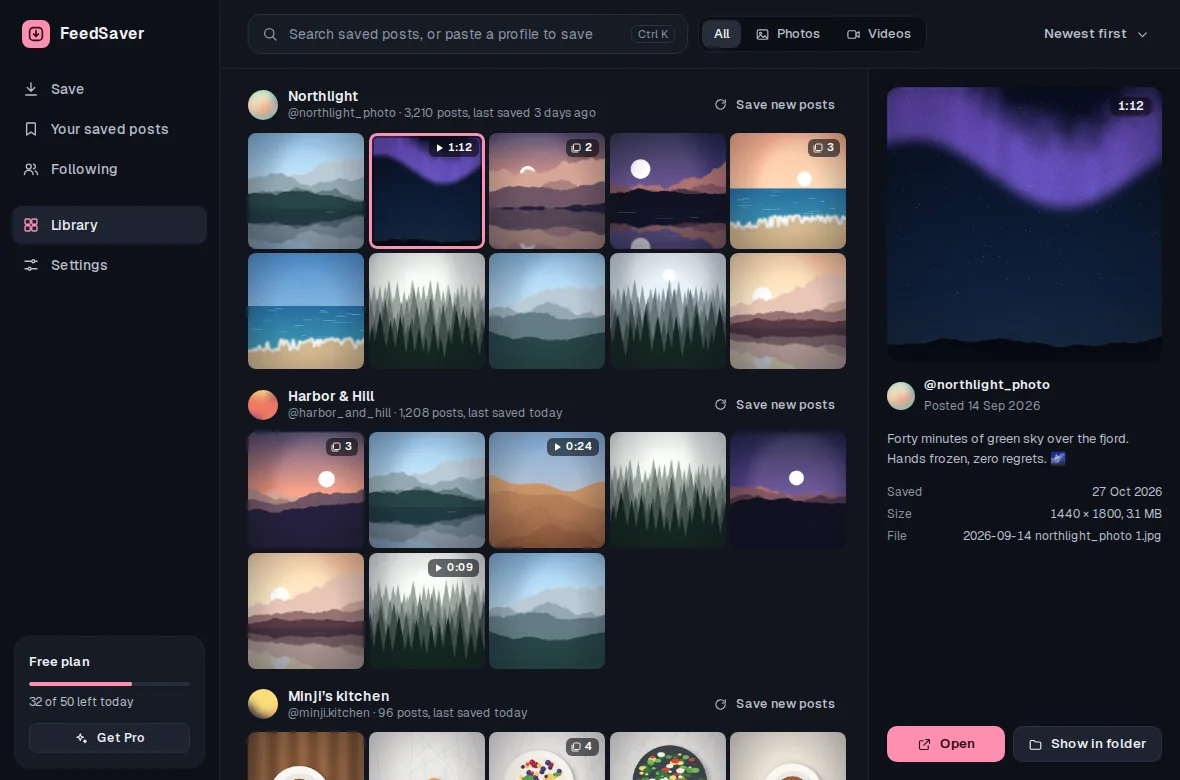
FeedSaver saves your posts the way you'd want to look at them later: each photo or video with its caption beside it, the post date in the file name, and a library where you can search for a word you remember.
- Install FeedSaver and log inIt runs on Windows 10 and 11. FeedSaver opens Instagram in its own window and you log in there; we never receive your password.
- Type your own @usernameIn What to save, choose All.
- Tick what you wantPosts, Reels, Reposts, Tagged, Stories (only ones still up) and Highlights. Keep Captions ticked under Include. Use Your saved posts in the sidebar for the posts you saved on Instagram.
- Let it runFeedSaver saves at a steady pace. The free version saves 50 files a day (caption files count), so a big account takes a few days; Pro ($39, once) removes the limit. If it stops, you can resume where it left off.
- Check the resultThe finished screen shows what was saved and what's missing. Open the Library and scroll through, or click Open folder to see the files.
What each one keeps
| Instagram's download | FeedSaver | |
|---|---|---|
| Photos and videos | Yes | Yes |
| Captions and dates | In separate data pages | Beside each photo |
| A library you can search | No | Yes |
| Highlights | Yes | One folder per highlight |
| Messages and comments | Yes | No |
| Archived stories | Yes, if you choose them | No |
| Drafts | Not assured | No |
Before you press delete
- Open both copies once. Make sure the photos you care about are really there.
- Save drafts by hand. Neither Instagram's download nor FeedSaver promises to include drafts, and they may only exist on your phone. Post, export or screenshot anything you need, and check it before you delete.
- Keep a second copy. Put the folders on an external drive or in your cloud storage too. One copy on one PC isn't a backup.
- Not sure yet? Instagram also lets you deactivate your account for a while instead of deleting it.
Honest limits
- Once an account is deleted, nothing can bring it back. Neither Instagram's download nor FeedSaver works after that. Save first.
- FeedSaver doesn't save messages, drafts, comments or archived stories. Instagram's own download is for messages and comments, and can include archived stories if you pick them.
- Only what Instagram shows. Posts you've already deleted can't be saved, and Instagram may not show every old post. FeedSaver shows what it saved and what is missing.
Common questions
Do I really need both?
If you want your messages, yes: only Instagram's download has them. If you mainly want your photos in a form you'll actually look at again, FeedSaver is the easier one to live with. Doing both costs nothing but a little time.
Can I save my photos after I delete my account?
No. Once the account is gone, its posts are gone too. Save everything before you delete.
Do I need a computer?
For FeedSaver, yes: it runs on Windows 10 and 11. Instagram's own download can be requested from your phone.