Log in, type the account's @username, tick the sources you want, choose All, and click Save. FeedSaver saves each post's photos, videos and caption into a folder named after the account.
Before you start
- The daily limit. The free version saves up to 50 files a day. Each photo, each video, each carousel image and each caption file is one file. A big profile takes a few days on the free version, and you can resume where it stopped. Pro ($39, paid once) removes the limit.
- An Instagram login. You log in in an Instagram window that FeedSaver opens. It can save public accounts, and private ones you follow.
- Room on your drive. Video-heavy accounts can take several gigabytes.
Step by step
- Log in to InstagramThe first time, FeedSaver shows a login screen and opens Instagram in its own window. It keeps the login session on your PC; we never receive your password.
- Type the @usernameType
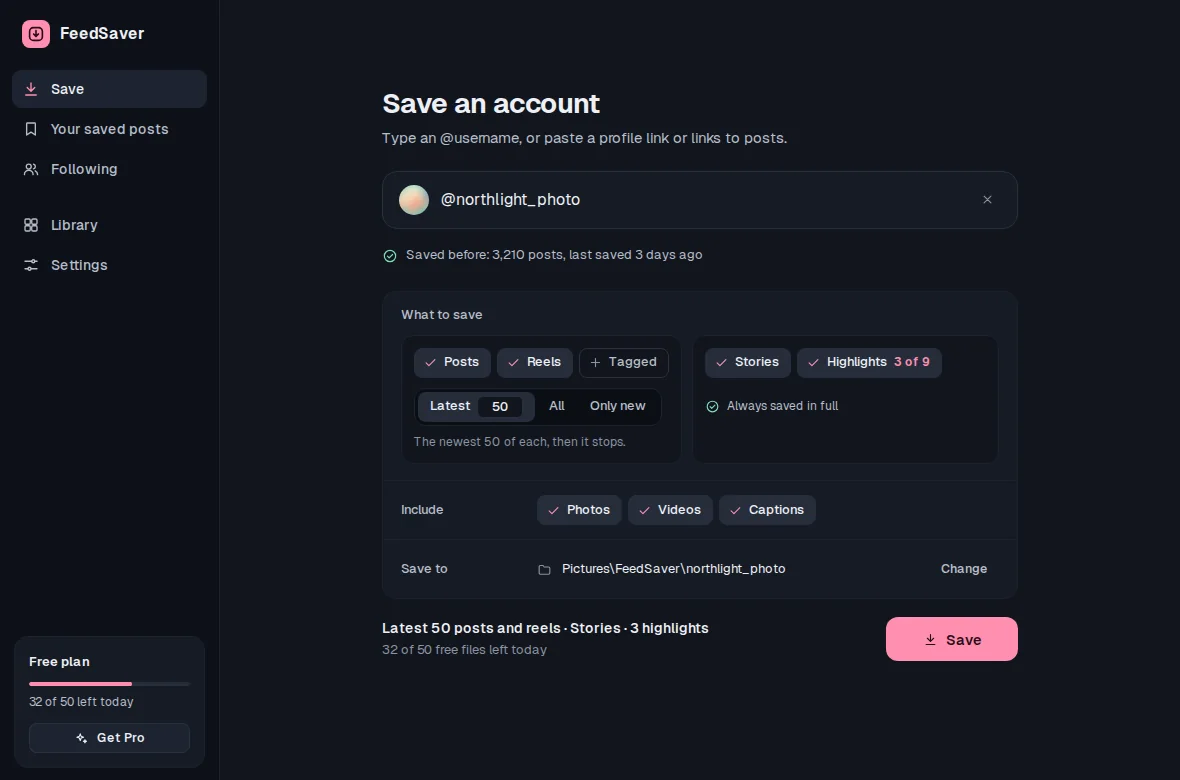
@usernameor paste the profile link into the Save box. - Choose what to saveUnder What to save, tick Posts, Reels, Reposts and Tagged as you like. Then pick Latest and a number, All, or Only new (for accounts you've saved before). Latest applies to each source you ticked.
- Pick the extrasTick Stories and Highlights if you want them. Under Include, choose Photos, Videos and Captions.
- Watch it fill inPhotos appear on a wall as they're saved, with posts, files and missing counts. You can stop at any time.
- Come back to it laterIf you stop, run out of free files, close the app, or Instagram asks it to pause, press Resume to carry on where it left off.
What you get on your PC
One folder per account. Each file name starts with the post date, so the folder sorts in order, and a carousel's images are numbered. The caption sits beside it as a text file. Reels, Reposts, Tagged, Stories and Highlights each get a subfolder.
northlight_photo/
  2026-09-29_northlight_photo_C7mQx2LpA1d_01.jpg   photo 1
  2026-09-29_northlight_photo_C7mQx2LpA1d_02.jpg   photo 2
  2026-09-29_northlight_photo_C7mQx2LpA1d.txt      caption
  reels/
  reposts/
  tagged/
  stories/
  highlights/
Honest limits
- It isn't instant. FeedSaver saves at a steady pace because Instagram can limit accounts that download a lot. A large profile can take a while, and if Instagram asks it to pause, it stops and waits until you press Try again.
- Instagram decides what's visible. Deleted, restricted or hidden posts can't be saved, and Instagram may not show every old post. FeedSaver shows what it saved and what is missing, rather than promising 100%.
- Private accounts can only be saved if you follow them and are logged in.
- Comments and likes aren't saved. You get the media, the caption and the post's date.
Common questions
Does it get the Reels tab?
Yes, if you tick Reels. They're saved into a reels folder inside the account's folder. Reposts and Tagged are separate tabs with their own tick boxes.
Can I download several profiles?
Yes, one after another. You can also paste a list of post links. With Pro, Update the accounts you follow goes through your Instagram following list, one account at a time, and saves what's new.
Will running it again download everything twice?
No. Files that are already saved are skipped, and they don't count toward the free limit. Choose Only new to stop as soon as it reaches posts you already have.